
Formal Curriculum Vitae

A professional job application is often made up of more than one document. Your curriculum vitae introduces your qualifications, experience, and skills, while a cover letter gives you room to explain your interest in a particular position. Presenting both with a consistent visual style can create a more coordinated application.
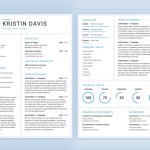
This free formal CV template provides a structured design for presenting your professional profile. Supplied in PSD format, it also includes a matching cover letter layout, allowing you to prepare both documents within the same design approach. Its formal appearance makes it a suitable starting point for applicants who prefer a professional presentation over a highly decorative resume.
The template is fully editable, with customizable text and design elements that can be adjusted to your requirements. It is designed for A4 pages, uses 300 DPI resolution, and supports print-ready preparation. Free fonts are also specified for use with the design.
The template is provided by José Ángel Rivas, whose work can be viewed on Behance.
A Consistent Presentation Across Two Documents
A CV and cover letter serve different purposes, but they should work together as parts of the same application.
The CV provides a structured overview of your professional background. It allows employers to review your employment history, education, skills, and other relevant qualifications. The cover letter, meanwhile, introduces your application and explains why your experience is relevant to the opportunity.
Having a matching design makes it easier to maintain visual consistency between these documents. Similar formatting and design elements can give the application a more unified appearance without requiring you to create two separate layouts from scratch.
When preparing the pair, keep the information specific to the role. Your CV should provide the supporting details, while your cover letter should focus on the connection between your background and the employer’s needs.
Build a CV Around Your Professional Profile
A formal resume should communicate important information efficiently. Rather than including every detail of your working life, concentrate on the qualifications and experiences that demonstrate your suitability for the position.
Start by reviewing the information you want to present. Depending on your career stage, this could include:
- Professional summary: A brief introduction to your background and career direction.
- Employment history: Previous positions, responsibilities, and relevant accomplishments.
- Education: Degrees, qualifications, and other academic achievements.
- Skills: Technical capabilities and professional strengths related to the role.
- Certifications: Relevant licenses, training, or professional credentials.
- Additional experience: Selected projects or activities that contribute to your professional profile.
You do not need to give every section equal space. An experienced professional may prioritize employment history and achievements, while a recent graduate may place more emphasis on education, internships, and relevant projects.
The purpose of customization is to make the most important information easy to find.
Use the Matching Cover Letter to Add Context
A CV lists your qualifications, but it does not always explain why you are interested in a particular position. The matching cover letter gives you an opportunity to make that connection.
Use the letter to introduce yourself, identify the role you are applying for, and highlight one or two experiences that demonstrate your suitability. Avoid repeating the entire employment history already included in the CV.
A useful cover letter generally addresses three points:
- Your reason for applying: Explain why the position or organization interests you.
- Your relevant background: Select experience or skills that relate directly to the advertised role.
- Your potential contribution: Describe how your qualifications could support the responsibilities of the position.
Remember to personalize the letter for every application. Update the recipient details and position information, and make sure the message reflects the actual employer rather than relying on a generic introduction.
The matching layout provides visual consistency, but the strength of the letter still depends on the relevance and quality of its content.
Customize the PSD Design to Suit Your Needs
The template is supplied in PSD format and allows you to customize both text and design elements. This flexibility gives you room to adapt the documents to your professional background and personal preferences.
You can begin by replacing the existing text with your own information. Then review the layout and adjust the elements that need modification. If you are using compatible software such as Adobe Photoshop, inspect the document’s organization before editing so that changes can be made carefully.
Consider the following customization steps:
- Replace all placeholder information with accurate personal details.
- Update employment and education entries to reflect your background.
- Adjust text to fit the amount of information you need to present.
- Customize design elements while maintaining a consistent appearance.
- Check spacing and alignment after making changes.
- Review both documents together to ensure their visual styles remain coordinated.
Avoid filling every available area simply because it is present in the template. A focused CV is generally easier to review than one containing excessive or unrelated information.
Typography and the Use of Free Fonts
The template specifies free font use, which is useful when preparing the design without relying on paid typefaces.
Typography contributes to the overall character of a formal CV. The chosen fonts should support readability and maintain a professional tone across both the resume and cover letter.
If you decide to change the typography, keep the number of font styles manageable. Use a consistent hierarchy for headings and body text, and make sure smaller text remains readable when the document is viewed or printed.
Font changes can also affect line breaks and spacing. After installing or replacing fonts, review both pages carefully to ensure that text has not shifted unexpectedly or become difficult to read.
Preparing the Documents for Printing
The template includes print-oriented specifications that provide a starting point for preparing physical copies of your CV and cover letter.
Its supplied features include:
- Paper size: A4
- Resolution: 300 DPI
- File format: PSD
- Design style: Formal
- Included documents: Resume and matching cover letter
- Customization: Editable text and design elements
- Typography: Free font use
- Output: Print ready
Before printing, inspect the exported documents at their intended page size. Check text clarity, margins, alignment, and consistency between the CV and cover letter.
For digital applications, export the finished documents into the file format requested by the employer. PSD is an editing format rather than a standard submission format. PDF is commonly used for sharing finished documents, but always follow the employer’s specific instructions.
If the application process uses an applicant tracking system, consider preparing a separate, simpler CV version. Graphic-heavy layouts may not always be interpreted accurately by automated document readers.
Who Can Use This Formal Resume Design?
The template is intended as a general-purpose personal CV rather than a design tied to one particular occupation. Its formal approach can be adapted to a variety of professional backgrounds.
It may be a useful starting point for:
- Office and administrative professionals.
- Business and management applicants.
- Finance and accounting candidates.
- Human resources professionals.
- Recent graduates entering the employment market.
- Experienced employees updating their career documents.
- Professionals preparing applications for new opportunities.
Regardless of your industry, the most important step is to adapt the content to the position. Emphasize relevant qualifications and remove information that does not support your application.
Present Your Application as a Coordinated Set
A well-prepared CV should make your professional background straightforward to understand, while a thoughtful cover letter provides additional context for your application. When both documents follow a consistent design, they can form a more cohesive professional presentation.
This free formal CV template offers an editable PSD design with a matching cover letter. Its A4 page size, 300 DPI resolution, print-ready setup, and free font use make it a practical starting point for creating personalized career documents.
Thanks to José Ángel Rivas for providing this free resource. Visit his Behance profile to explore his work, and customize the template to present your qualifications clearly and professionally.
Related Free Resume Template


Related Products


Same Contributor


Featured Products


