
Bourk Resume
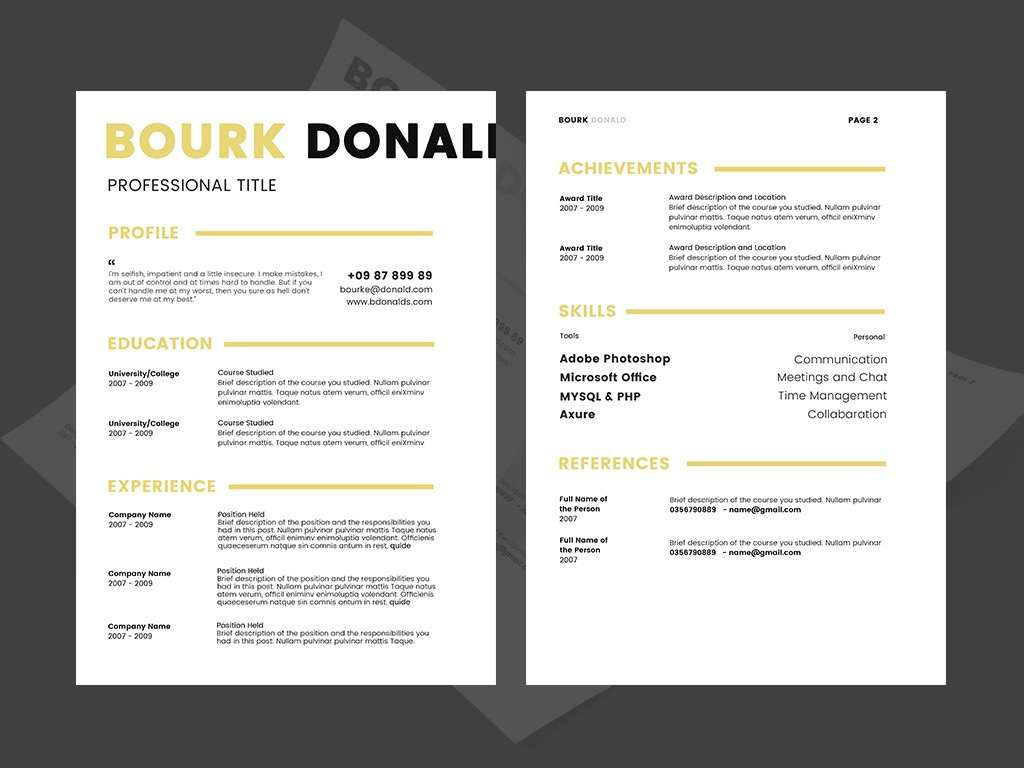
Finding a resume design that looks professional without feeling overcrowded can make preparing a job application easier. This free PSD resume template from Designcoon offers a clean, simple layout with two visual styles: black and white, and gold and black. With two resume pages included, it provides a flexible starting point for organizing professional experience, education, skills, and other career information.
Designed for customization in Adobe Photoshop, this template allows job seekers to adapt the layout to different positions, industries, and personal branding preferences.
A Clean Resume Design for Professional Applications
The template emphasizes simplicity and readability, making it suitable for applicants who prefer a structured presentation over elaborate graphics. Its two color variations provide different ways to present the same professional information.
The black-and-white version offers a classic appearance that can work well for traditional corporate applications. The gold-and-black alternative introduces a more distinctive visual style, making it an option for candidates who want a touch of elegance in their application materials.
Both versions can serve as a foundation for a personalized resume. You can replace the sample text with your own details, adjust the typography, and reorganize sections to reflect your experience and career goals.
Template Features
This free resume template includes several practical features for job seekers and designers:
- Two resume pages: Organize your professional background across two pages.
- Two color variations: Choose between black and white or gold and black.
- A4 paper size: Suitable for standard A4 printing.
- PSD file format: Edit the design using Adobe Photoshop or compatible software.
- Print-ready resolution: Prepared at 300 DPI for high-quality output.
- Fully editable layout: Customize text, colors, and design elements to suit your needs.
- Poppins font: Uses the Poppins typeface, which contributes to its clean, contemporary appearance.
These features make the template useful for creating a consistent resume design while allowing room for individual adjustments.
Customize the Resume to Match Your Career Goals
One advantage of an editable PSD resume is the ability to tailor its content to a specific job opportunity. Before submitting your application, update every section with relevant information and remove any placeholder content.
Consider including a concise professional summary, recent work experience, educational qualifications, key skills, certifications, and notable achievements. Use measurable results where possible, such as improvements in efficiency, completed projects, sales growth, or customer satisfaction.
You can also adjust the section order according to your career stage. Experienced professionals may prioritize employment history and achievements, while recent graduates can give greater attention to education, internships, academic projects, and relevant technical skills.
For a consistent presentation, select one color version and use it throughout your resume and any matching application materials.
Who Can Use This Resume Template?
The versatile design can be adapted for a range of professional fields, depending on the role and the information included.
Potential applications include:
- Business and administration: Business Development Associate, Office Administrator, Operations Coordinator, Executive Assistant
- Finance and accounting: Financial Reporting Analyst, Accounts Payable Specialist, Junior Accountant, Banking Associate
- Technology: Software Developer, IT Support Specialist, Data Analyst, Systems Administrator
- Marketing and communications: Marketing Coordinator, Public Relations Associate, Content Strategist, Digital Marketing Specialist
- Engineering and technical services: Mechanical Engineer, Quality Assurance Engineer, Technical Support Engineer, Project Engineer
- Human resources: Recruitment Coordinator, HR Generalist, Talent Acquisition Specialist, Training Administrator
- Education and research: Teaching Assistant, Research Associate, Academic Coordinator, Learning Support Specialist
- Creative and professional services: Graphic Designer, Brand Coordinator, Presentation Designer, Client Services Consultant
These are suggested uses rather than restrictions. The template can be adapted to many other occupations by changing the content and emphasizing the qualifications most relevant to each position.
Editing Tips for the Best Results
To get the most from this free Photoshop resume template, keep the design consistent and focus on the information employers need to evaluate your application.
Keep your content concise. Use short descriptions and bullet points to make responsibilities and accomplishments easier to scan.
Maintain clear visual hierarchy. Make section headings, job titles, and dates easy to distinguish. Avoid adding unnecessary decorative elements that compete with important information.
Choose the right color variation. Black and white may suit conservative industries, while gold and black can provide a more distinctive presentation for selected roles.
Check typography and spacing. The Poppins font supports a modern look, but font size, line spacing, and contrast should remain comfortable to read.
Review printing and digital compatibility. The template is designed for A4 printing at 300 DPI. Export a final copy as a PDF when appropriate, and check that text remains legible and that no content is clipped.
Consider applicant tracking systems. A visually appealing resume does not automatically guarantee compatibility with applicant tracking systems (ATS). If an employer requests a plain-text or ATS-compatible resume, prepare a simpler version with conventional headings and a straightforward layout.
Download the Free PSD Resume Template
This free PSD resume template from Designcoon provides two resume pages and two color variations in a clean, customizable design. Its A4 format, 300 DPI resolution, and Poppins typography make it a useful starting point for preparing professional application materials.
Download the template, select the style that best suits your needs, and personalize the content for your target position. Remember to verify the template’s usage terms and any font licensing requirements before using it for commercial purposes.


Related Products


Same Contributor


Featured Products


